
Binary Number Worksheet Generator
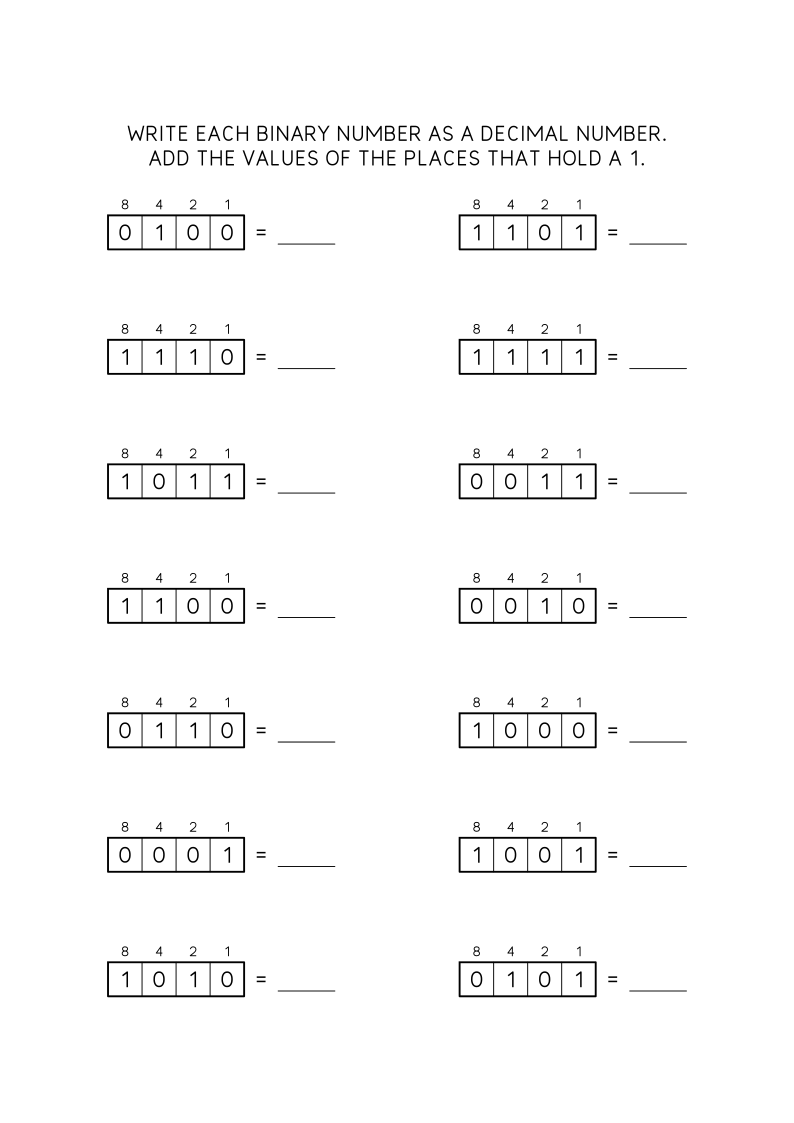
Make binary number worksheets to print, with every bit in its own box. Exercise offers Binary to Decimal, where the bits are given and the number goes on a line; Decimal to Binary, where the boxes wait for a 1 or a 0; Both Ways, which alternates the two; and Binary Addition, two numbers added in columns with a strip above them for the carries and a row of boxes for the sum.
Bits sets the size of the numbers: 4 Bits, a nibble, for 1 to 15; 6 Bits for 16 to 63; 8 Bits, a full byte, for 64 to 255. Place values prints 1, 2, 4, 8 and the rest of the powers of two above the boxes, or leaves them out with None. Line numbers puts 1., 2., 3. in front of the exercises; Show the instructions prints the method above the exercises, such as 1 + 1 makes 10: write 0 and carry 1; and Font switches between Pebble and Granite.
A page holds fourteen conversions of different numbers, or twelve additions, eight on 8 bits. Show the solution fills in every line, every box and every carry in orange.
This browser is too old to make the page: please update it, or use another one. Here is an example page in the meantime.
The latest printable pages whose sheets were made with this generator, ready to download.


Frequently Asked Questions
How Do You Convert Binary to Decimal?
Each place is worth twice the one on its right: 1, 2, 4, 8, 16, 32, 64, 128. Write those values over the bits, or keep Place values on the page, then add the values that sit over a 1: 101101 is 32 + 8 + 4 + 1 = 45. A 0 adds nothing, so zeros at the front change nothing either, which is why 0101 and 101 both mean 5. On Binary to Decimal pages the bits stand in their boxes, an equals sign follows, and the decimal number goes on a 15 mm line; the instructions put the method in one sentence: add the values of the places that hold a 1.
How Do You Convert Decimal to Binary?
Two methods work. The first takes away the largest place value that still fits and writes 1 under it, then goes on with what is left: for 45, take 32 (13 left), skip 16, take 8 (5 left), take 4 (1 left), skip 2, take 1, which gives 101101. The second divides by 2 again and again and reads the remainders from the last to the first: 45 gives 22 remainder 1, then 11 r 0, 5 r 1, 2 r 1, 1 r 0 and 0 r 1, so 101101 again. On Decimal to Binary pages every box gets a 1 or a 0, the zeros in front included: on 6 bits, 22 is written 010110.
What Are Bits, Nibbles and Bytes?
A bit, short for binary digit, is a single 0 or 1. Four bits make a nibble, which holds 16 values, 0 to 15; eight bits make a byte, which holds 256, 0 to 255; every bit added doubles the count. The Bits setting follows those sizes: 4 Bits uses the numbers 1 to 15, 6 Bits the numbers 16 to 63, which need at least five bits, and 8 Bits the numbers 64 to 255, which need seven or eight, so a number never has more than one zero in front. The boxes are 9 mm wide on 4 bits, 8 mm on 6 and 6.5 mm on 8, so that two columns of exercises still fit across the page.
How Does Binary Addition Work?
Column by column from the right, as in base ten, except that a column carries as soon as it reaches two: 0 + 1 makes 1, 1 + 1 makes 10, so write 0 and carry 1, and 1 + 1 + 1 makes 11, so write 1 and carry 1. For example 101 + 110 gives 1011, which is 5 + 6 = 11. The two numbers are aligned by place, without zeros in front, the carries go in the strip above them and the sum in its row of boxes. The sum always fills its boxes exactly: from 8 to 15 on 4 bits, 32 to 63 on 6 bits and 128 to 255 on 8 bits. On 4 bits half the sums need no carry; on 6 bits each needs at least one, on 8 bits at least two.
Should the Place Values Stay on the Page?
At first, yes. With Place values set to On the page, the worth of each place stands over its box, from 1 on the right up to 8, 32 or 128, so a conversion becomes a simple sum and an addition shows which column carries into which. Once the powers of two come without thinking, set it to None: the boxes stay, the numbers above them go, and the child has to rebuild the place values in pencil or from memory, which is the real test of understanding. The exercises and the answers stay exactly the same either way.
What Does Both Ways Practice?
Switching direction. Both Ways alternates the two conversions on one page of fourteen, starting with a number to read in binary, then one to write in binary, and so on, so the child cannot fall into one routine. The instructions say WRITE THE MISSING NUMBER, in binary in the boxes or in decimal on the line. It also makes the best check of a single method: a number converted one way and back again must come out unchanged.
How Many Conversions and Additions Fit on a Page?
Conversions come fourteen to a page, all different, in two columns of seven read downward, each row giving the boxes, an equals sign and the decimal number. Additions come twelve to a page in three columns, or eight in two columns on 8 bits, read across; the same pair of numbers never appears twice, and the larger one sits above or below at random. Line numbers adds 1., 2., 3. in front of every exercise, handy when answers are read out in class; without them, each conversion starts with its boxes and each addition with its plus sign.
Why Do Computers Use Binary?
An electronic circuit is easiest to build with two clear states, on and off, high voltage and low, and binary needs exactly two digits. So everything a computer keeps is a pattern of bits: the letter A is stored as 65, which is 01000001, and each of the red, green and blue values of a pixel is often one byte, from 0 to 255. That is why the 8 Bits pages stop at 255, the largest number one byte can hold, and why counting in binary so often opens a first computer science course.
How Can You Check a Binary Answer?
Convert it back. A number written in binary is right if its place values add up to the decimal number given; a binary sum is right if it matches the sum of the two numbers in decimal, as 1011 matches 5 + 6. Show the solution redraws the page with every answer in orange dashes: the decimal numbers on their lines, a bit in every box with its zeros in front, and on addition pages each carry, a small 1 above the column that receives it, so a wrong sum can be traced to the exact column where it went astray.
When Do Students Learn Binary?
In England, binary is part of the computing curriculum for Key Stage 3, ages 11 to 14, which asks pupils to represent numbers in binary, convert between binary and decimal, and carry out binary addition: the three exercises of this generator. In the US it is not in the Common Core math standards and usually comes with computer science classes, often in middle school, or as an enrichment topic on place value. Starting on 4 bits with the place values shown suits a first lesson at any age.